
Everything You Need to Build a Six-Figure Online Business: Tools, Resources, and Strategies
We’re thrilled to share proven tools and strategies that have elevated our business and our clients. We’ve gathered everything you need in one place to run a profitable, organized business effortlessly. Save time and effort while growing globally, all from your smartphone, and focus on what matters most—your clients and business growth.
Let’s Get Started!

Supercharge Your Social Media and Online Sales Strategy with Our Free eBooks!
Download the Ultimate Guide to Building a Strong LinkedIn & Social Media Presence – Increase Leads and Sales, Create Lead Magnets, and Convert Prospects into Paying Clients:
LinkedIn Sales Machine -eBook
- Build a Strong LinkedIn Presence: Optimize your profile, grow your network, and establish authority in your industry.
- Increase Leads and Sales: Implement proven tactics to attract and engage your target audience, turning connections into valuable leads.
The Lead Magnet -eBook
- Create Effective Lead Magnets: Develop irresistible offers that capture contact information and build your email list.
- Nurture and Convert Clients: Learn how to nurture your leads with targeted content, personalized communication, and strategic follow-ups, ultimately converting them into loyal, paying clients.
FREE Tools: CRM, Sales Funnel, Landing Pages, Sales Pages, and Email Marketing System with Automation
- Comprehensive CRM: Manage all your customer relationships in one place, improving organization and efficiency.
- Sales Funnel Builder: Easily create effective sales funnels to guide prospects through the buying process and increase conversions.
- Landing and Sales Pages: Design high-converting landing and sales pages without needing technical skills.
- Email Marketing Automation: Automate your email campaigns to nurture leads and drive sales, saving you time and effort.
- Seamless Integration: Connect all tools effortlessly for a unified marketing strategy, enhancing your workflow and data consistency.
If you need any help setting up, connect with our experts today!

How to Design Different Types of Sales Funnels for Maximum Conversion
- Drive Traffic & Convert Leads: Attract more visitors to your website and turn them into leads and paying clients
- Build Custom Sales Funnels: Create sales funnels tailored to your business for maximum conversions.
- Boost Engagement: Use personalized content to keep your audience engaged and ready to convert.
- Increase Customer Retention: Implement strategies to keep your customers coming back with loyalty programs and post-purchase follow-ups.
- Optimize with A/B Testing: Continuously improve your funnel’s performance by testing different elements.
FREE Training – “Boost Your Sales & Revenue with Cutting-Edge AI & Automation without Paid Ads or Social Media Hustle”
(Helpful for Selling Digital Products or any Services)
- Automated Lead Generation: Focus on high-quality leads, saving time and resources.
- Personalized Customer Interactions: Enhance customer satisfaction and drive repeat business.
- Advanced Sales Analytics: Make data-informed decisions to optimize strategies and ROI.
- Streamlined Sales Processes: Close deals faster and build stronger customer relationships.
Say goodbye to all sales and technical Complexes!

Get a Perfect Domain Name at the Lowest Price
- Wide Selection: Choose from a vast array of domain extensions and find the perfect match for your business.
- Easy Setup: Makes it simple to register and manage your domain and professional emails, so you can focus on what you do best – running your business.
Build a User-Friendly and Mobile-Friendly WordPress Website with Drag-and-Drop Ease, No Coding Required
- Effortless Customization: Create a professional website with drag-and-drop ease, no coding.
- Responsive Design: Ensure your site looks great on all devices automatically.
Imagine Potential Clients are Searching Your Brand and Requesting Your Services or Products!

FREE AI Tools: Elevate Your Business & Brand with AI
1. Content & Copy Writing:
- ChatGpt: Content Brainstorming & Drafting, Engaging Ad Copy & Landing Pages, SEO Optimization Assistant.
- Google Gemini: Human-Quality Blog Posts & Website Content, Personalized Marketing Automation with Gemini, Data-Driven Content Strategy.
- Claude: In-Depth White Papers & Reports, Compelling Product Descriptions & Sales Copy, Multilingual Content Creation.
- Grammarly Chorme Extention: Writing assistance, Grammar and spell-check, style suggestions, and plagiarism detection.
2. FREE Designing Tools: Templates, Images and Videos Generation
- Canva: User-friendly graphic design platform with drag-and-drop tools, millions of templates, and free and paid plans to create stunning visuals for any need.
- Microsoft Designer: Graphic design app with AI-powered features like image generation from text descriptions and background removal.
- InVideo: Free AI video generator that turns your text ideas into professional-looking videos with script, voiceover, and stock footage.
- Download FREE Stock Images & Video: Use “Pixabay”, “Unsplash”, “Pexel”.
- Social Media Management: Use “Linktree” to bring your TikTok, Instagram, Twitter, website, store, videos, music, podcast, and events together in a powerful link-in-bio landing page designed to convert.
3. Transform Your Website into a Magnet for Potential Clients and a Conversion Engine.
- Optimize Website for SEO & Mobile Friendly: Use “WordPress with Elementor Free” to design visually appealing websites using free themes and the Elementor page builder.
- Implement SEO Best Practices: Use “Google Keyword Planner” to conduct keyword research to find relevant keywords for your content and use “Ubersugges” to get keyword suggestions, SEO analysis, and backlink data.
- Social Proof and Testimonials: Set up a “Google Business Profile” to gather client feedback and improve your search ranking. Additionally, use Trustpilot (Free Plan) to collect and showcase customer reviews.
- Convert Traffic into Leads with Free Resources: Add lead capture forms to your homepage to offer something against their leads, nurture with follow-ups, and use email marketing. Click here for free tools with automation.
- Offer Free Trials and Demos: Use “Calendly” to automate scheduling and streamline demo bookings, and “Zoom” to conduct live product demos with potential clients, boosting conversion rates.
- Analytics and Monitor Performance: Use “Google Analytics” to track visitor behavior, page performance, and conversion rates.
- Live Chat and Chatbots: Provide real-time customer support with a free live WhatsApp chat widget. Use the “Click to Chat” WordPress Plugin.
“Stuck on Something? Our Experts Are Available to Help!”
Create Evergreen Webinars to Effortlessly Sell Your Products or Services on Automation!
- Step-01: Identify Your Audience and Topic: Research your audience’s needs and choose a timeless, relevant topic.
- Step-02: Plan and Create Content: Outline key points, develop a script, and design high-quality slides with engaging visuals.
- Step-03: Record and Edit Webinar: Use tools like Zoom for recording and editing with software like Filmora or Shotcut.
- Step-04: Create a Landing Page & Video Sales Letter: Design a compelling Landing Page to showcase your offer. Once visitors enter their details, redirect them to your Video Sales Letter (Video Page) where your webinar is hosted.
- Step-05: Call to Action: Encourage them to schedule a free one-on-one consultation or discovery call with you using Calendly. During the call, explore their needs and present tailored solutions just for them.
- Step-06: Promote the Webinar: Use email marketing with Mailchimp or Sendinblue, and promote through LinkedIn, YouTube, Facebook Groups, and WhatsApp Groups. If you have a budget, run paid ads for extra reach.
- Step-07: Engage and Follow Up: Incorporate quizzes, polls, and Q&A sessions. Use automated email campaigns to send follow-up emails with additional resources.
Click Here to Start with a FREE All-in-One Platform
Let’s explore real-life examples of how our work with clients has successfully achieved their sales and revenue targets with this model.
Facing Challenges? Let Our Experts Guide You to Success!
How to Sell on WhatsApp
- Step-01: Set up a WhatsApp Business account, Create themed groups, and Segment your audience based on interests or product categories.
- Step-02: Send tips, how-to guides, industry news, and product updates. Use multimedia like images, short videos, and voice notes.
- Step-03: Offer exclusive deals, Share promo codes or special offers only available to group members, and Create time-limited flash sales.
- Step-04: Ask questions and run polls using WhatsApp’s built-in poll feature. Prompt discussions on relevant topics.
- Step-05: Provide customer support. Respond promptly to inquiries.
- Step-06: Host virtual events. Conduct live Q&A sessions or product demonstrations.
- Step-07: Implement a referral program. Encourage members to invite people in their network to join the community.
- Step-08: Promote your WhatsApp community through blog posts, newsletters, and Social Media Posts (LinkedIn, FaceBook) with a clear invitation in your content for readers/viewers to join your exclusive WhatsApp group for more personalized help.
- Step-09: Conduct webinars and live sessions on topics that address the needs and interests of your group members. Showcase how your paid products or services can solve problems more effectively or provide additional value.
- Step-10: Send follow-up messages in the WhatsApp group, highlighting the key benefits and success stories related to your products or services.
Looking for Expert Support? We’re Here to Assist You!
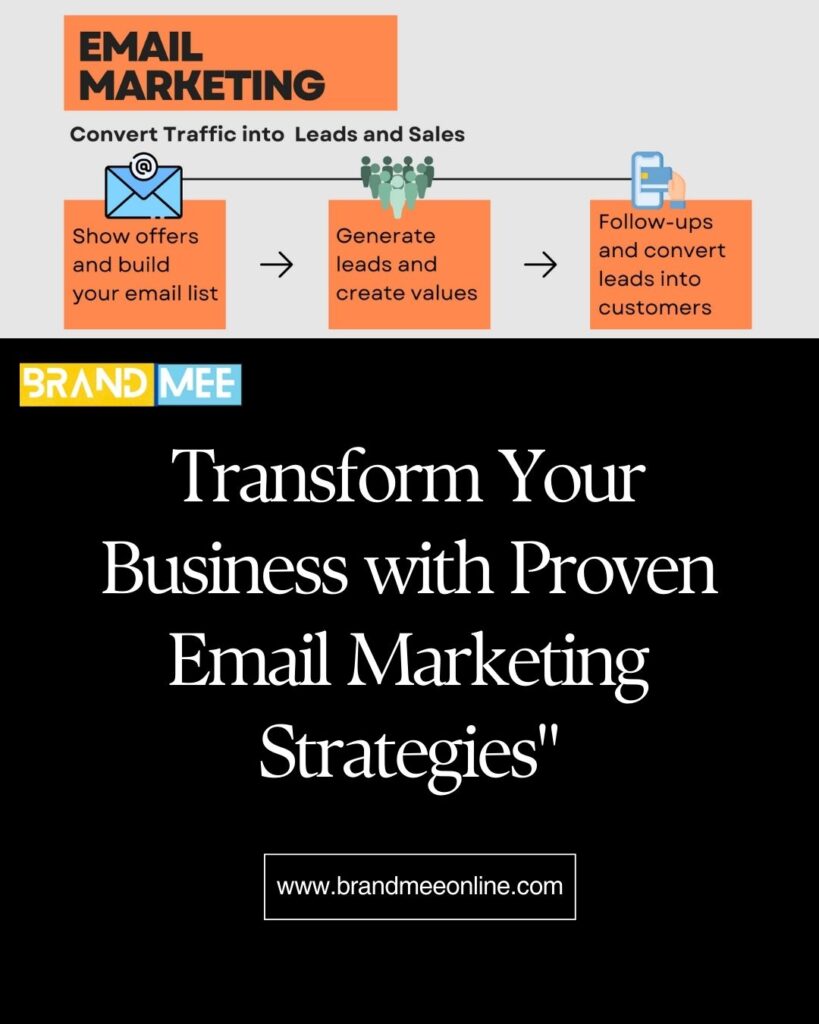
How to Sell Using Email Marketing
(Click Here to Get Free Tools)
- Step-01: Set Up Your Email Campaign: Clearly outline what you’re offering and how it benefits your audience. Include clear calls to action like “book a free consultation,” “WhatsApp chat,” or “join our community” on platforms like Facebook, LinkedIn, Telegram, or WhatsApp.
- Step-02: Build a Contact List: Use “Apollo io” free version to gather 2000 potential client contacts. Utilize LinkedIn’s to find and connect with potential leads. Integrate Apollo Chrome Extn to LinkedIn.
- Step-03: Upload and Test Data: Upload your email marketing system with 50 contacts per day. Use a small batch of contacts to test and optimize your email campaigns before a full launch.
- Step-04: Utilize Free Email Marketing Tools: Use Mailchimp with its free plan for creating and managing campaigns. MailerLite is another great free option.
- Step-05: Add Lead Forms to Your Website: Integrate lead forms from your email marketing service provider. Offer Lead Magnets to provide valuable content (e.g., eBook, checklist) in exchange for email sign-ups.
- Step-06: Nurture Leads Consistently: Send regular emails to keep your audience engaged with consistent communication. Use automation feature. Provide Value through informative content, tips, and insights to build trust and authority.
- Step-07: Monitor and Analyze: Use the analytics tools in your email marketing platform to monitor open rates, click-through rates, and conversions.
Need a Hand? Our Experienced Team Is Here to Help!
Online Payment Tools to Easily Accept Payments Through Different Modes and Streamline Transactions.
- Razorpay: Supports multiple payment methods including UPI, debit/credit cards, net banking, and wallets. Offers recurring payments and invoicing…Get Started.
- Instamojo: Provides payment links, QR codes, and an online store. Accepts payments through UPI, cards, and wallets…Get Started
- PayU: Supports UPI, debit/credit cards, net banking, and wallets. Offers payment links, subscriptions, and invoicing.
- PayPal: Supports international payments, multiple currencies, and accepts payments via credit/debit cards and PayPal balance. Offers invoicing and payment links.
- Stripe: Supports multiple payment methods including credit/debit cards, UPI, net banking, and wallets. Offers subscription billing, invoicing, and payment links.
- PhonePe: Supports UPI, debit/credit cards, and wallets. Offers payment links and integration with merchant accounts.
Need Help? Our Experts Are Here to Help!
Disclaimer
Our website contains affiliate links, which means we may earn a commission if you click on a link and make a purchase. This comes at no additional cost to you. We only recommend tools and strategies that we have found to be beneficial for ourselves and our clients. However, we do not guarantee any specific outcomes or results. Your success may vary depending on various factors unique to your situation.